
Why Most Filipino Players Choose the no1 App Over the Browser
Browsing no1 from a mobile browser works fine — the site is fully responsive and you can access everything without installing anything. But the dedicated no1 app takes the experience a step further. It loads faster, uses your screen space more efficiently, and puts your most-used features front and centre without the extra steps of opening a browser and navigating to the site each time.
For players who check in regularly — whether that's following live PBA scores from Manila, watching live dealer tables from Cebu, or doing a few slots spins during a break in Davao — having the app installed makes the whole routine smoother. The no1 app is available for both Android and iOS, and the experience is nearly identical across both platforms. All account functions, payment options, and game sections are accessible from within the app.
Everything transacts in Philippine Peso, and account security — OTP verification, SSL encryption, and KYC protection — works exactly the same as on the desktop version. The app isn't a stripped-down mobile version; it's the full no1 platform adapted for the phone in your pocket.
Download no1 for Android or iOS
Android
Download the no1 APK directly for Android phones and tablets. Works on Android 6.0 and above — compatible with most current Philippine Android devices.
Android 6.0+APK direct install · No Play Store required
Get the Android AppiOS
Install the no1 app on your iPhone or iPad. Optimized for iOS 13 and later, with full support for the latest iPhone and iPad screen sizes.
iOS 13+iPhone & iPad compatible
Get the iOS AppNote for Android users: The no1 APK is downloaded directly rather than through the Google Play Store. Before installing, go to your phone's Settings, then Security or Apps, and enable "Install from unknown sources" or "Allow installs from this source" for your browser. This is a standard step for APK installations and does not affect your device's security when downloading from the official no1 site.

How to Install the no1 App on Android
Enable Unknown Sources
Go to Settings on your Android phone, find Security or Apps & Notifications, and toggle on "Allow installs from unknown sources" or enable it specifically for your browser app.
Tap the Android Download Button
Press the "Get the Android App" button above on your Android device. The no1 APK file will begin downloading to your phone's storage.
Open the Downloaded File
Once the download is complete, tap the notification or find the APK file in your Downloads folder. Tap to open it and begin installation.
Follow the Installation Prompts
Your phone will show an installation screen. Tap "Install" and wait a few seconds for the process to complete. The no1 app icon will appear on your home screen.
Login or Register and Start Playing
Open the no1 app, log in with your existing account or register a new one, and you're ready to access all games and account functions.
How to Install the no1 App on iPhone or iPad
Tap the iOS Download Button
On your iPhone or iPad, tap "Get the iOS App" above. You may be redirected to the installation page or prompted to trust the app source.
Trust the App Profile (If Prompted)
If iOS asks you to trust a developer profile, go to Settings, then General, then VPN & Device Management, and tap Trust under the relevant profile name.
Allow the Installation
Confirm the installation when prompted. The no1 app will download and install automatically. This usually takes less than a minute on a stable connection.
Open the App and Sign In
Locate the no1 app icon on your Home Screen or App Library. Open it, log in with your credentials, and your full account and game library will be ready to use.
no1 App vs Mobile Browser — What's Different?
Both options give you full access to no1, but the app has some practical advantages for regular players. Here's a quick breakdown:
| Feature | no1 App | Mobile Browser |
|---|---|---|
| Load Speed | Faster — cached assets | Good but slightly slower |
| Home Screen Access | Direct icon | Bookmark needed |
| Push Notifications | Supported | Not available |
| Full Game Access | All games | All games |
| Account Functions | Full access | Full access |
| Biometric Login | Fingerprint / Face ID | Depends on browser |
| Storage Required | Small download needed | No download |
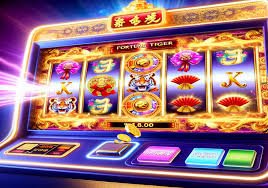
What You Get in the no1 Mobile App
Full Game Lobby
Access the complete no1 game catalog from the app — slots, live casino, sports, eBingo, table games, and esports all in one place.
Live Sports Betting
Place in-play bets on PBA, NBA, football, boxing, volleyball, and esports events. Odds update in real time directly in the app.
Live Casino Streaming
Watch and play live dealer tables in HD video directly from your phone. Baccarat, blackjack, roulette — all streamed live with real dealers.
Deposits & Withdrawals in PHP
Manage your balance, deposit via local banking channels, and request withdrawals — all in Philippine Peso, directly from the app.
Secure & Encrypted
SSL encryption protects every session. OTP verification and KYC security work identically to the desktop — no compromises on mobile.
Push Notifications
Get notified about live game events, account activity, and updates directly on your phone. Stay in the loop without having to open the app first.
No Download? No Problem — The Browser Version Works Too
If you'd rather not install anything, just open no1.vin in your mobile browser. All games and account functions work in-browser without any download required.

Frequently Asked Questions — Downloading no1
Gaming on the Go — Play Responsibly
Having the no1 app on your phone makes it easy to play anytime — which also makes it easy to lose track of time or budget. A few habits worth building:
- Set a daily or weekly budget in PHP before opening the app, and stop when you hit it
- Use the app's session timer if available, and take regular breaks
- Don't play when you're tired, stressed, or trying to recover losses
- The no1 app is for players aged 21 and above only
- If gaming on mobile feels hard to control, reach out for support
The no1 app uses SSL encryption for all data in transit. Your personal information, payment details, and account activity are handled securely on mobile the same way they are on desktop. For full details, read our Privacy Policy.